Automation: Update a Spotify Playlist
There are so many little tasks every week that alone don't take up much time, but added together, amount to a substantial weekly workload. The more of these things I can get off my plate and simply check in on once in a while, the more I can focus on other work.
This week I found a way to use ActivePieces to clear one of these weekly tasks from my weekly routine. If you're not familiar with ActivePieces or API-based automations, check out my previous article explaining the basics of using an automation tool to connect different web applications.
The Task at Hand
We have a public Spotify playlist that contains a list of the songs we'll be singing during our services over the next several weeks. This gives people a chance to listen at home, get the songs in their heads, and be better prepared to participate and engage with the songs on Sunday mornings. It's particularly helpful when we introduce new songs.
Once a week I'll open up the playlist, remove any songs from previous weeks, then add any new ones to maintain the next four weeks' setlists. We typically sing four songs each week, so the playlist usually has sixteen songs, except for cases where we sing a song multiple times within a given four week span.
Updating the playlist takes a couple minutes at most, but because it's a small, seemingly trivial task, it easily gets pushed off and forgotten, leaving a playlist that is outdated more often than not.
This is the perfect type of task for automation, and ActivePieces makes it relatively easy.
How It Works
The basic flow of the automation is:
- Clear the existing playlist.
- Check Planning Center and pull all songs scheduled for the next four weeks.
- Find a matching song on Spotify for each of the songs found in Planning Center.
- Add those songs to the playlist.
- Send an email report of all the songs added and include any errors that were encountered.
Now instead of having to think to update the playlist, I simply receive an email each week notifying me that it's been done, and I only need to intervene if there have been any errors, like if a match couldn't be found for a song.
Note: For the purpose of this playlist, I'm not terribly concerned about exactly which version of a song is added. As long as it's the same song, the arrangement or the artist doesn't matter, so whatever search result Spotify pulls up is what gets added to the playlist. However, the email report sent after the automation runs contains details about the version selected so I can easily see if there's anything I might want to change.
The image below shows the full flow of the automation in ActivePieces.
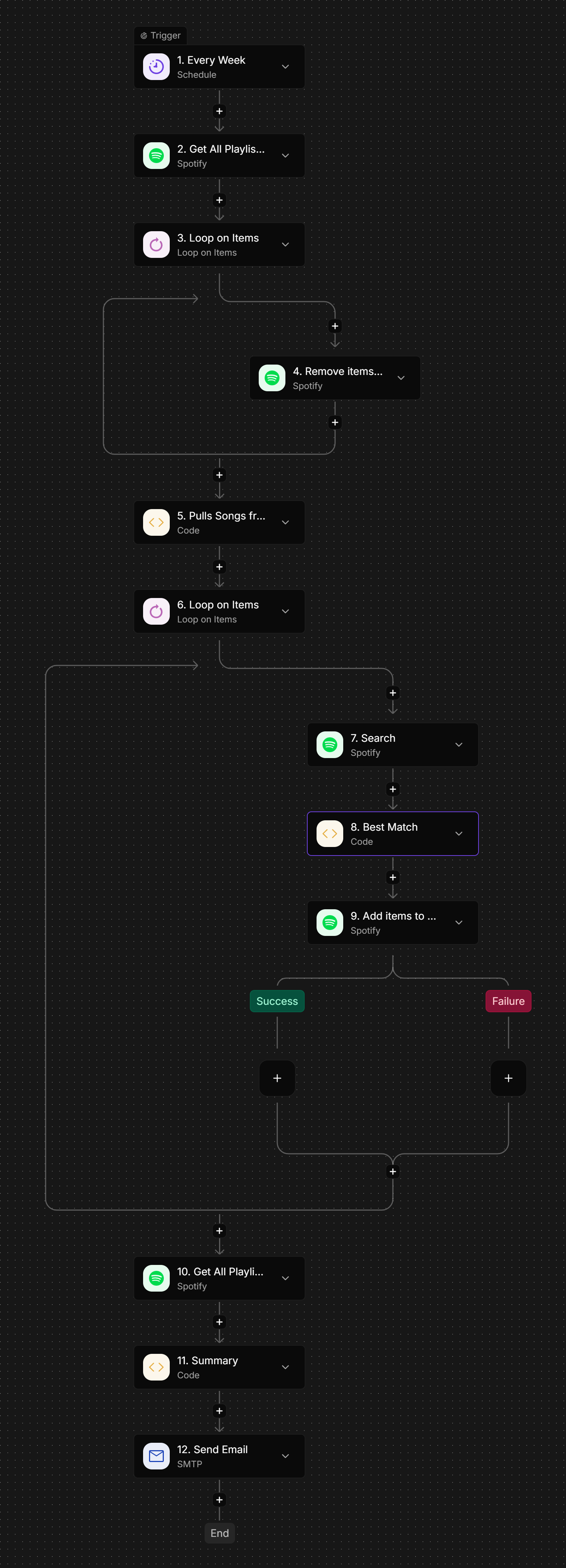
Without going into full details of how this is set up, I will make a few comments on the steps of the flow.
Steps 2-4
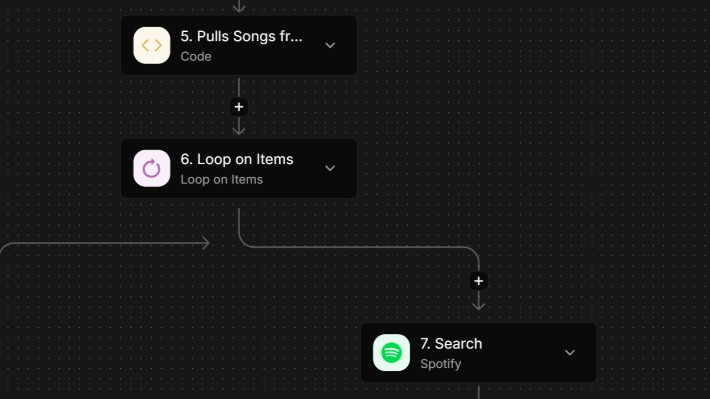
There's no API call (that I'm aware of) to directly clear an entire playlist in Spotify, so we first need to get a list of all the items in the playlist (Step 2). Then we can loop through each song (Step 3), removing each one individually (Step 4).
Step 5
This step gets a list of the songs scheduled in Planning Center over the next four weeks. It's looking specifically at the title and artist metadata for an MP3 attached to the song arrangement. It also makes note if a song in Planning Center doesn't have an MP3 attached to the arrangement and adds this to the report sent at the end of the flow.
Steps 6-9
This loop (Step 6) iterates through each song found in Planning Center. It searches Spotify (Step 7) for the title and artist returned from Planning Center and returns the top five results. Step 8 determines the best match of those five results, then adds it to the Spotify playlist in Step 9. A Success/Failure path follows Step 9 to prevent the entire flow from stopping in the event that a match isn't found for a particular song.
Steps 10-12
These are the reporting steps. Step 10 gets the newly updated Playlist contents, while Step 11 assembles them (along with any error reporting) into a readable summary. That summary is then sent to me via email in Step 11.
The email report I get looks like this:
Spotify playlist updated.Tracks currently in playlist: 14Playlist contents:• Your Church — Canyon Hills Worship, Michael Gabriel Monroe | Your Church• Only a Holy God — CityAlight | Only a Holy God• Christus Victor (Amen) - Live — Keith & Kristyn Getty, Cochren & Co., Sing! | Sing! Songs of the Bible - Live At The Getty Music Worship Conference• etc...Missing MP3 attachments:• The Heart Of Worship — Default ArrangementNo MP3 attachment found on arrangement.• It Is Well With My Soul — Hymn VersionNo MP3 attachment found on arrangement.
I can quickly scan the email to make sure the automation didn't add any oddball versions of a song to the playlist, and I'm also alerted to songs in Planning Center that didn't have an mp3 attached to the arrangement.
If you're interested in digging even deeper into exactly how every step was configured in ActivePieces, send me an email ([email protected]) and I'd be happy to explain the details. I can even share the entire flow with you to import directly into your own instance of ActivePieces.
And if you've found other uses for automation, whether with ActivePieces or another tool, let me know. I'd love to find new ways to make tasks like these more efficient.